

Validation Book - online service
Before you start
The employer is obliged to keep a validation book in the event of temporary unemployment due to bad weather and economic reasons.
The validation book is intended to provide the National Employment Office (NEO) with an overview of all numbered C3.2A control forms, issued as certificates of temporary unemployment due to bad weather or economic reasons. Employers in the construction sector are not required to keep a validation book.
At the beginning of a period of temporary unemployment, the employer has to give the employee a copy of control form C3.2A. Before issuing this form, the employer should mention the number on the form in the validation book.
The data has to be entered in the validation book on the same day as the employer issues the forms.
The employer only has to enter control forms in the validation book C3.2A relating to temporary unemployment due to bad weather or economic reasons. He does not have to enter C3.2A control forms relating to other types of temporary unemployment.
Warning: If the employer expects that there will be bad weather or a lack of work due to economic reasons later in the month, it is recommended to still enter these forms in the validation book. In this way, he won’t have to complete them later in the month.
Only the forms that are actually issued should be entered in the validation book. The employer is allowed to enter the forms he has drawn up, but not issued (e.g. because the employees have been kept at work) in the validation book, but this is not required.
By using the online service Validation Book, the employer is no longer required to keep a validation book in paper format, which is numbered continuously and stamped by the unemployment office.
You can find more information in the ONEM Validation book (in French).
The online service Validation Book aims at employers and their agents having access to the secure environment of the portal website of social security (in French).
All technical information about the validation book is gathered in TechLib.
On the online service Validation Book page (in French) click on the button ‘Compléter livre de validation’ (‘fill in validation book’).
Choose the means of identification.
Before entering the number on the control form C3.2A in the validation book, please complete the fields related to employer identification.
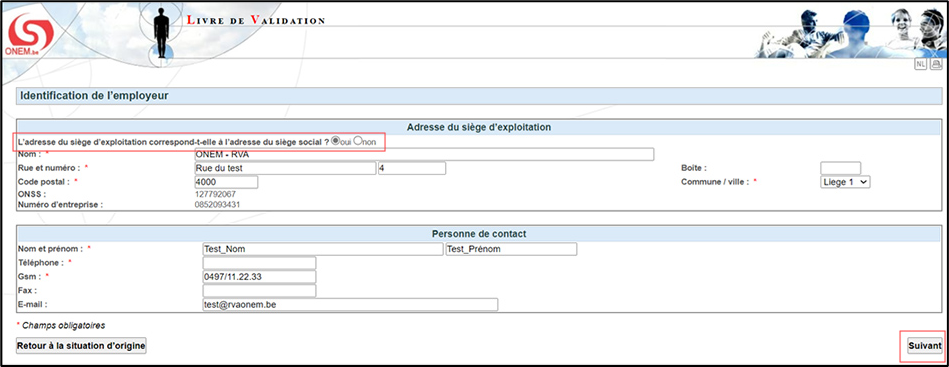
There are two answers to the question ‘l’adresse du siège d’exploitation correspond-t-elle à l’adresse du siège social ?’ (‘Does the address of the establishment unit correspond to the head office address?’):
- If ‘Oui’ (‘yes’), the following fields are automatically completed: ‘Nom’ (‘name’), ‘Rue et numéro’ (‘street and number’), ‘Code postal’ (‘postcode’), ‘ONSS’ (‘NSSO’), ‘Numéro entreprise’ (‘enterprise number’);
- If ‘Non’ (‘no’): complete these different fields.
Please complete the fields related to the contact person: ‘Nom et prénom’ (‘surname and first name’), ‘telephone’/ ‘GSM’ (phone number), ‘E-mail’ (‘email’).
If all mandatory fields are completed, click on ‘suivant’ (‘next’).
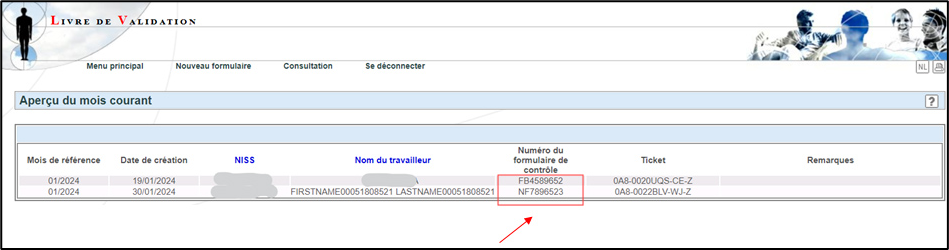
The form numbers entered for the current month are displayed in the field ‘numéro du formulaire de contrôle’ (‘number of control form’).
Via the button ‘nouveau formulaire’ (‘new form’), which is used for employers who employ fewer than 100 employees, the list of his employees is displayed on the basis of his Dimona declarations. An employer employing more than 100 employees has to enter the Social Security Identification Number of the employee concerned in the field ‘NISS’ (‘SSIN’).
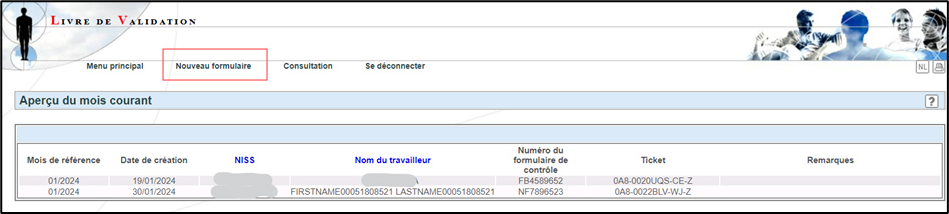
Click on ‘Nouveau formulaire (‘new form’) to enter a new declaration.
Individual encoding
The individual registration allows you to select an employee from the Dimona list. This list is only displayed if less than 100 employees are registered in the Dimona.
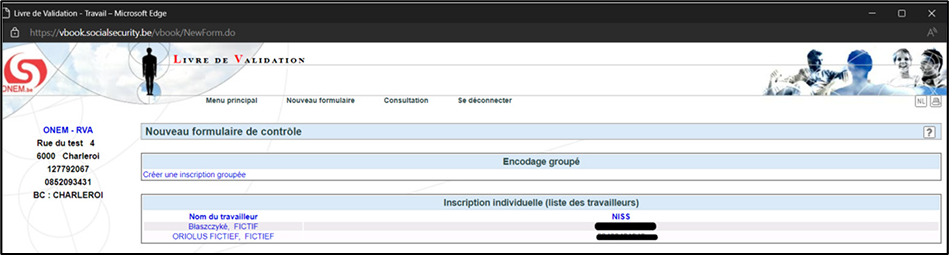
If there are more than 100 employees registered in Dimona, the search will be performed based on the Social Security Identification Number of the employee concerned in the field ‘NISS’ (‘SSIN’).
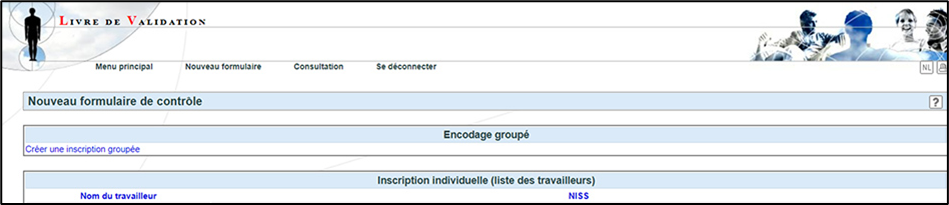
Encode the Social Security Identification Number of the employee in the field ‘NISS’ (‘SSIN’). After that, click on ‘OK’ (‘ok’).
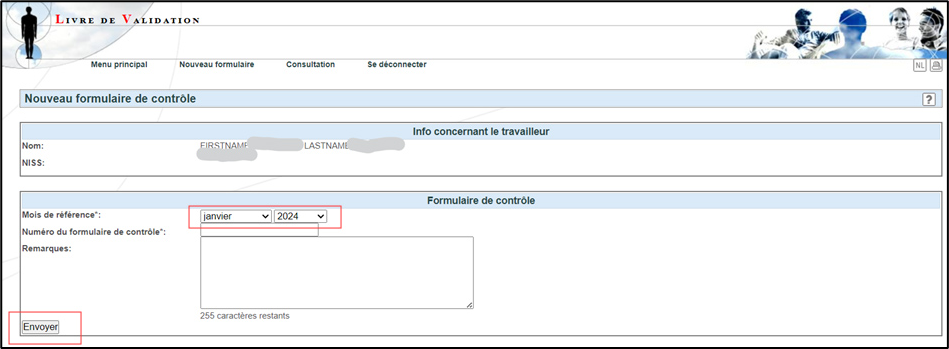
Select the correct month for this form in the field ‘Mois de référence’ (‘reference month’) and encode the reference into the form in the field ‘Numéro de formulaire de contrôle’ (‘control form number’).
Click on ‘Envoyer’ (‘send’).
Bulk encoding
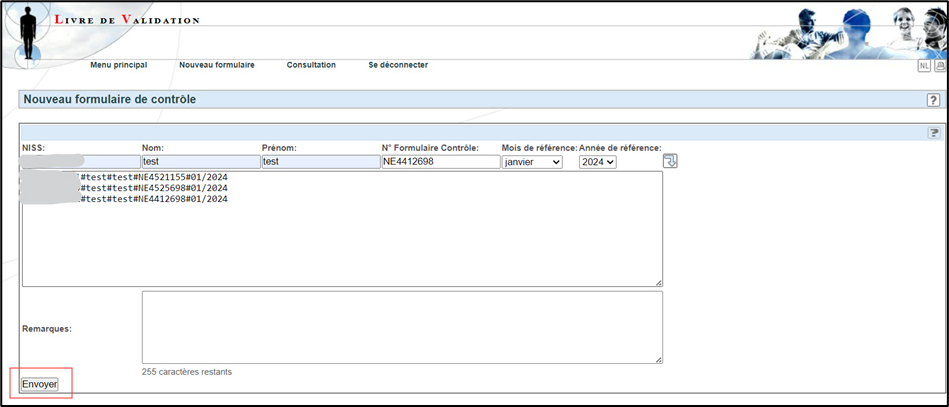
The grouped encoding allows you to enter several form numbers in a row for several employers.
Encode the relevant data in ‘NISS’ (‘SSIN’), ‘Nom’ (‘surname’), ‘Prénom’ (‘first name’), ‘N° Formulaire contrôle’ (‘control form number’), ‘Mois de reference’ (‘reference month’) and ‘Année de reference’ (‘reference year’). Click on the arrow in the square next to the year to confirm and on ‘Envoyer’ (‘send’).
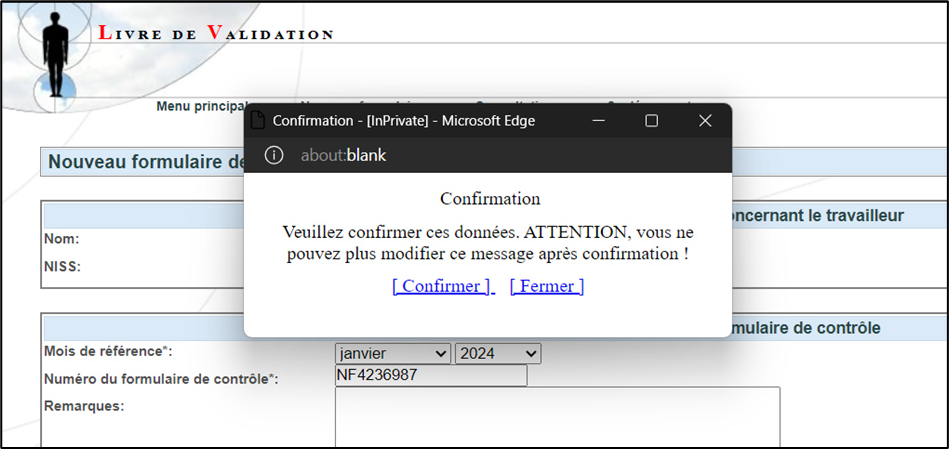
After having entered the form number and having clicked on ‘Envoyer’ (‘send’), you should see a confirmation pop-up.
Without this pop-up, the submission of the control form number (click 'Confirmer') is not validated , and consequently, you will not receive a ticket number.
If this pop-up does not appear, please make sure you have allowed pop-ups for this website in your browser settings.
Acknowledgment of receipt
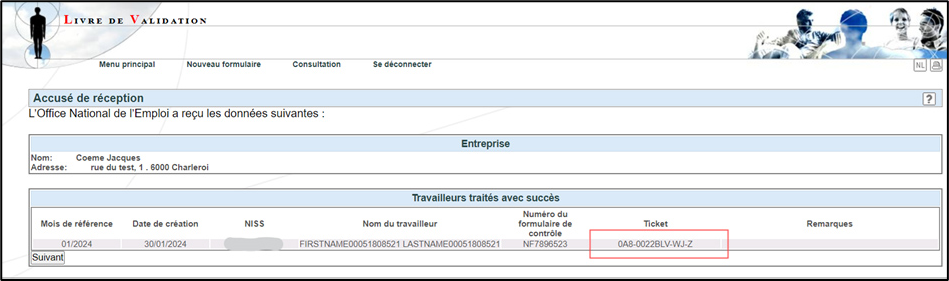
After the confirmation, you will receive an acknowledgment of receipt with a ticket number.
It is possible to perform a search via the consultation button in the validation book.
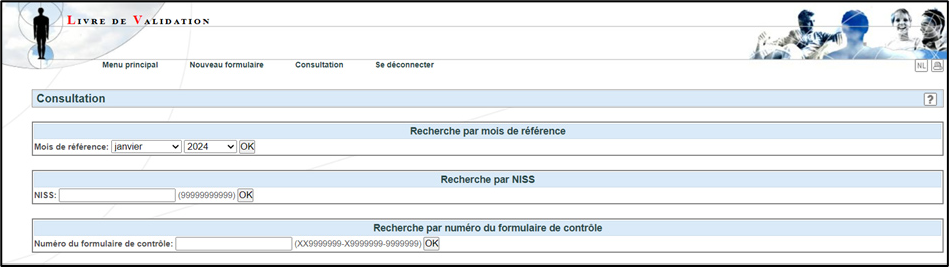
You can carry out a consultation in the following 3 different ways:
- by ‘Mois de reference’ (‘reference month’);
- by ‘NISS’ (‘SSIN’);
- by ‘Numéro de formulaire de contrôle’ (‘control form number’).

Funded by the European Union – NextGenerationEU. Views and opinions expressed are however those of the author(s) only and do not necessarily reflect those of the European Union or European Commission. Neither the European Union nor the European Commission can be held responsible for them.
National Employment Office (NEO)
- Telephone: +32 (0)2 515 44 44
- Website: www.onem.be (in french)
You can also get in touch via our Contact page.


