

Consultation invoices employers - online service
Before you start
What is Consultation invoices employers?
Consultation invoices employers (‘Consultation factures employeurs’ in French) is an online service which gives an employer affiliated to the NSSO insight in all NSSO invoices for their company. The online service is accessible for employers, as well as social secretariats or payroll service firms mandated by the employer.
Employers use this online service to consult specific NSSO documents, such as:
- Advance payment documents
- Reminder documents
- Modification messages
Before getting secured access to the online service Consultation invoices employers, you need to:
- Obtain secure access via the registration page of Social security enterprise portal (in French) and click on the option for companies registered as employers (‘Mon entreprise est enregistrée comme employeur’ in French).
- Consequently, click on the option I want to manage my obligations towards the NSSO myself (‘Je souhaite traiter moi-même mes obligations administratives envers l’ONSS’ in French) on the NSSO registered companies page on the Social security enterprise portal (in French).
- Follow the list of actions that unfolds about assigning Access Managers.
- On the Consultation invoices employers page of the Social security enterprise portal (in French), click the button labelled Consult invoice employers (‘Consultation factures employeurs’ in French). It gives access to the online service Consultation invoices employers (‘Consultation factures employeurs’ in French).
- You arrive on the Access page to the secure services on the Social security enterprise portal. Use your preferred login method to proceed.
- You now have access to the main screen of the online service Consultation invoices employers, giving an overview of available documents, as can be seen in the screenshot below.
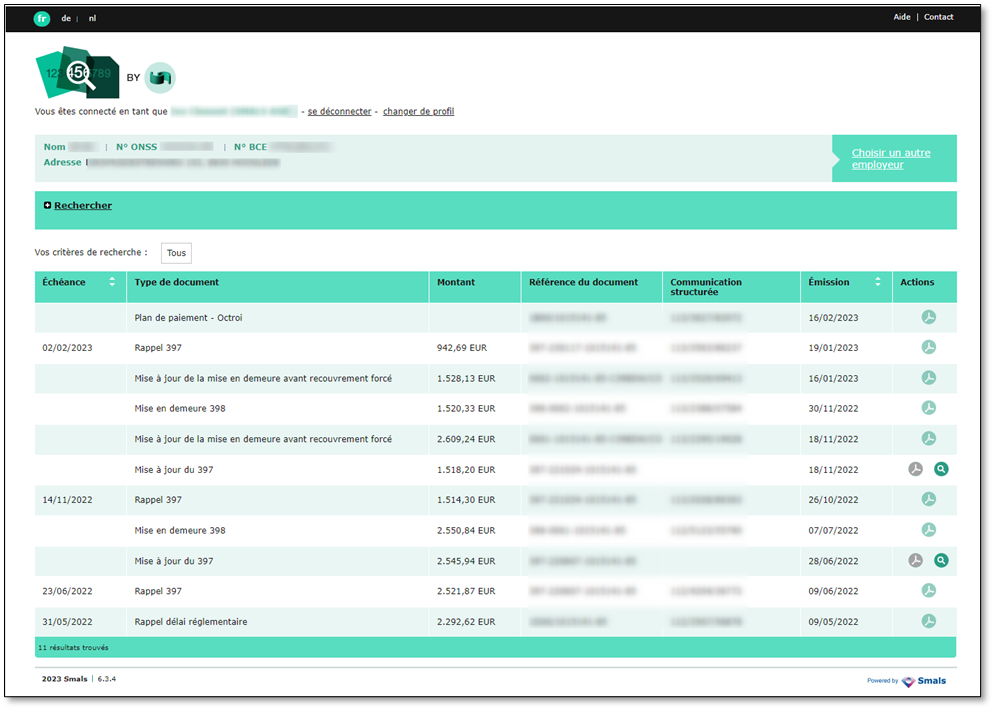
Selecting the search criteria
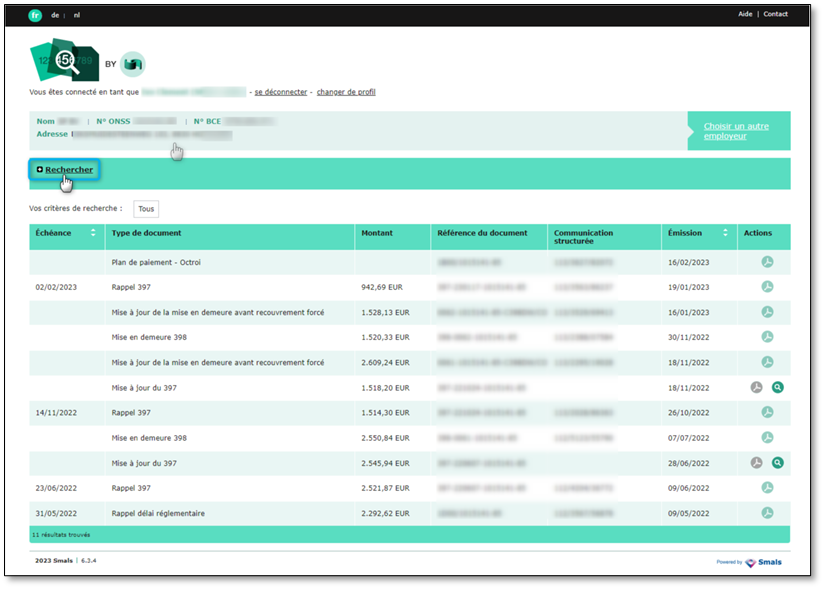
You can search for specific documents by using the search function. Click on Search (‘Rechercher’ in the screenshot) to open the search filters.
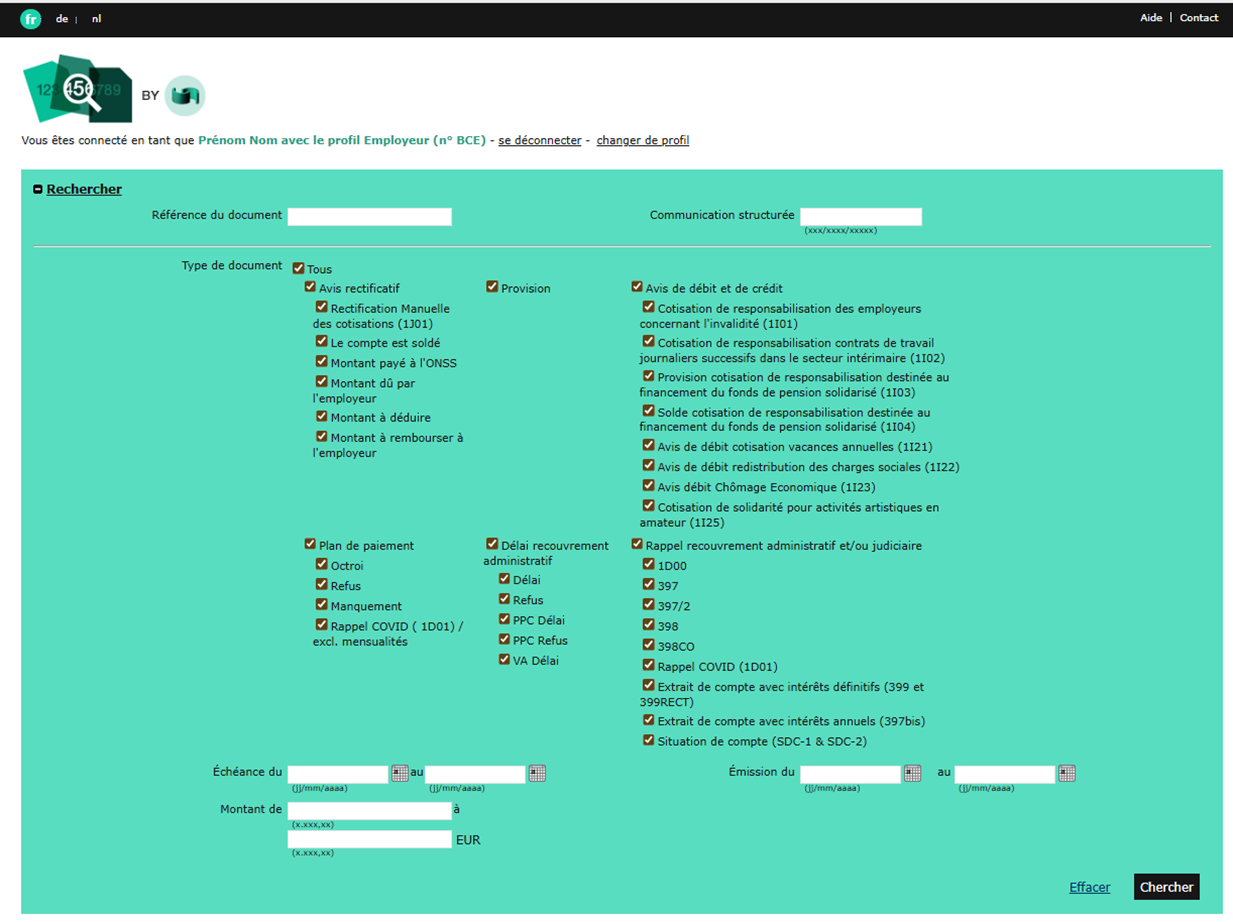
As you can see in the screenshot above, the search window expands displaying all possible search filters that can help you refine your search. All document types are checked by default. You can:
- Fill out the fields:
- Document reference (‘Référence du document’ in the screenshot): a reference given by the NSSO, and/or,
- Structured message (‘Communication structurée’ in the screenshot): a structured message that is needed when making the payment in the form ‘xxx/xxxx/xxxxx’.
- You can also uncheck or check specific boxes to refine the search:
- Document type (‘Type de document’ in the screenshot):
- All (‘Tous’ in the screenshot): all documents;
- Notification of modification (‘Avis rectificatif’ in the screenshot): modifications of the DmfA declaration:
- The account is balanced (‘Le compte est soldé’ in the screenshot): settling of due payments;
- Amount paid to the NSSO (‘Montant payé à l’ONSS’ in the screenshot): amounts already paid;
- Amount due by the employer (‘Montant dû par l’employeur’ in the screenshot): amounts to be or to have been paid;
- Amount to be deducted (‘Montant à déduire’ in the screenshot): amounts that can be deducted from other due payments;
- Amount to be reimbursed to the employer (‘Montant à rembourser à l’employeur’ in the screenshot): amounts that will be reimbursed;
- Provision: requests for an advance payment;
- Instalment plan (‘Plan de paiement’ in the screenshot): application of an instalment plan:
- Approval (‘Octroi’ in the screenshot): approval of an instalment plan;
- Refusal (‘Refus’ in the screenshot): refusal of an instalment plan;
- Violation (‘Manquement’ in the screenshot): missing instalment payments;
- Reminder COVID (1D01) (‘Rappel COVID (1D01)’ in the screenshot): COVID-19 instalment plan granting deferral until 15/12/2021.
- Deferral of administrative reclaim (‘Délai recouvrement administratif’ in the screenshot): granting or not granting a deferral of payment by the NSSO:
- Deferral (‘Délai’ in the screenshot): granting of a deferral of payment;
- Refusal (‘Refus’ in the screenshot): refusal of a deferral of payment;
- Deferral - Short Payment Plan (‘PPC Délai’ in the screenshot): granting of a deferral of a Short Payment Plan;
- Refusal - short payment plan (‘PPC Refus’ in the screenshot): refusal of a deferral of a Short Payment Plan;
- Deferral annual holiday (‘VA Délai’ in the screenshot): granting of a deferral of payment of the balance of the 2nd quarter due to the holiday period and collective closure during the holidays (July/August).
- Reminder for deferral of administrative and/or judicial reclaim (‘Rappel recouvrement administrative et/ou judiciaire’ in the screenshot): payment reminding documents:
- 1D00: payments regarding due dates without mark-ups;
- 397: payments regarding due dates with mark-ups;
- 397/2: payments regarding a recalculation of interest;
- 398: formal notice in case of failure of payment of a debt;
- 398CO: update on a formal notice before a coercive collection;
- Reminder COVID (1D01) (‘Rappel COVID (1D01)’ in the screenshot): reminders about COVID-19 deferral of payment until 15/12/2021;
- Account statement including definitive interests (‘Extrait de compte avec intérêts définitifs (399 et 399RECT)’ in the screenshot)
- Account statement including annual interests (‘Extrait de compte avec intérêts annuels (397bis)’ in the screenshot)
- Account balance (‘Situation de compte (SDC-1 & SDC-2)’ in the screenshot)
- Document type (‘Type de document’ in the screenshot):
- You can also fill out date ranges to refine the search:
- Due date from/to (‘Échéance du/au’ in the screenshot): interval in which the payment must be made at the latest;
- Issue date from/ to (‘Émission du/au’ in the screenshot): interval in which the document was issued;
- Amount from/to Document type (‘Montant de/à’ in the screenshot): range in which the amount due lies.
Click on Search (‘Chercher’ in the screenshot) to confirm and continue or on Erase (‘Effacer’ in the screenshot) to cancel your search.
Search result page
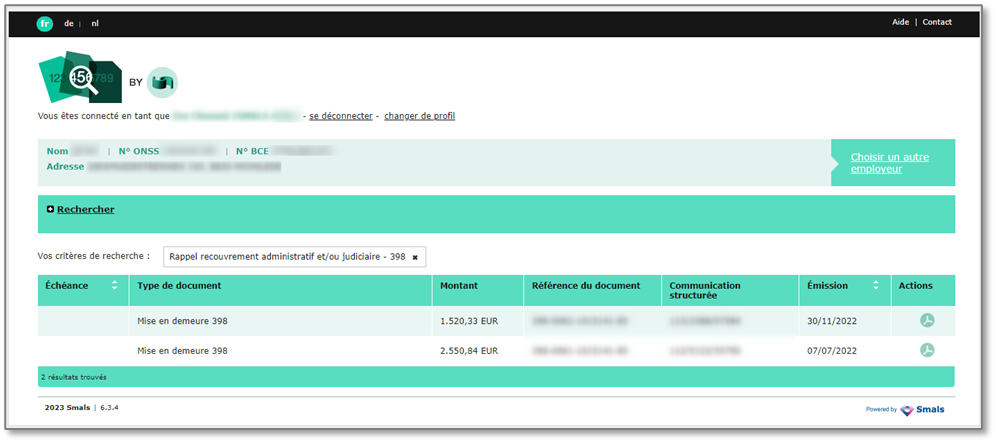
Based on your selection you get a screen containing all documents that match your search criterea.
The field ‘Your search criteria’ (‘Vos critères de recherche’ in the screenshot) contains an overview of all the search criteria used to obtain this specific result.
In the table each line contains specifications about a document, from left to right:
- Due date (‘Échéance’ in the screenshot);
- Type of document (‘Type de document’ in the screenshot);
- Amount (‘Montant’ in the screenshot);
- Document reference (‘Référence de document’ in the screenshot);
- Communication structure (‘Communication structurée’ in the screenshot);
- Issue date (‘Émission’ in the screenshot);
- Actions: click on the icon below to open the PDF version of the document;

Funded by the European Union – NextGenerationEU. Views and opinions expressed are however those of the author(s) only and do not necessarily reflect those of the European Union or European Commission. Neither the European Union nor the European Commission can be held responsible for them.
National Social Security Office (NSSO)
- Address: Place Victor Horta, 11 - 1060 Brussels
- Telephone: +32 (0)2 509 59 59
- Website: www.onss.be (in french)
You can also get in touch via our Contact page.


